bPopulr provides a good web counter as below,
Above widget is just for this page. You can see the installed widget on right of this blog.
It shows total hits, today hits and here now.
You can get the Free button code here.
Additionally, you can see the referred links of your website and graphical statistics if you click the widget.
And bPopulr home shows the today popular web sites.
All of this good service are free and easy to use. (via coping & pasting the free code)
Showing posts with label web2.0 - tools. Show all posts
Showing posts with label web2.0 - tools. Show all posts
Thursday, October 4, 2007
[Blog Tips] Cool web counter widget showing total, today, here


Wednesday, October 3, 2007
Let's use Search Box of Google Blogger
If you want to provide "search" to your visitors in case of Google Blogger, let's use the "Search Box" element.
It is easy to install and its design is cool.
Moreover, the whole page is not refreshed to show the result. Only the area for the result is reloaded.
I think that such a different way as AJax make it possible.
You can see the look as below or search using this blog's Search Box on the right.
Installation on your Google Blogger
It is very easy.
After go Dashboard / Template / Page Elements, click "Add a Page Element".
Then select the following Search Eelement.
Cautions!
You should access the Draft Dashboad of Blogger via http://draft.blogger.com/home.
At time of writing this post, only the Draft version provide Search Box element.
(The default dashboard URL is http://www.blogger.com/home)
If you want to check if you are on which dash board, check the log as below,
In case of Draft
In case of Default .
.
Sunday, September 30, 2007
How to retrive a closed tab in FireFox, Opera, IE7
When you close a tab in FireFox, Opera, IE7 by mistake you can easily restore it.

In case of FireFox
By pressing Ctrl+Shift+T
Also it restore more than one closed tab. And besides it restore the position of the closed tab.
In case of Opera
By pressing Ctrl+Alt+Shift+Z
In case of IE7
It does not support restoring for closed tabs. But after installing IE7 Open Last Closed Tab 3.5 which is a free add-in you can do it by pressing Alt+X as FireFox and Opera.
You can download this useful add-in here.
Ref: Closed An IE Browser Tab By Mistake? Get It Back Easily
Using On/Offline Blog Editing Programs
All of Blog services or programs provide their own editing program.
But the functionality of blogging programmes is not good as a word processor. To use powerful features of a word processor You may first write a post using a word process (e.g. MS Word) and copy and paste to your blog editing program when your are on-line.
Copying a word document and pasting it into a blogging program is not always what you want and intend.
It can be create unnecessary coding behind behind scenes and can not be rightly shown as you intend (e.g. font, intend, align, etc).
To avoid above problems, let's use the following blog editing programs.
MS provides a good free blog editing program.
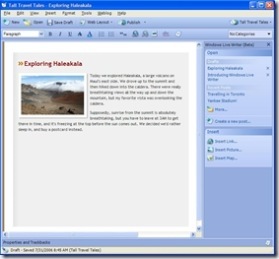
Windows Live Write supports the following powerful features,
WYSIWYG Authoring
You can author your post and know exactly what it will look like before you publish it.
Photo, Map publishing
Compatibility
Windows Live Write works with Windows Live Spaces, Blogger, LiveJournal, TypePad, WordPress (and many others)
On/Offline Editing
You can write a post offline and upload it to your blog. And you can get the existing posts from your blog and can edit/upload it.
Powerful Editing Features
Table, intend, font, underline, bold, block quote, strike out, etc
You also see and edit HTML code.
You can freely download this nice program here.
Like Windows Live Write, Qumana is a good free blog editing program.
Also, you can insert an advertisement called Q-Ads into your post.
And Qumana support the list of existing posts with their content. you can open/edit them as below,
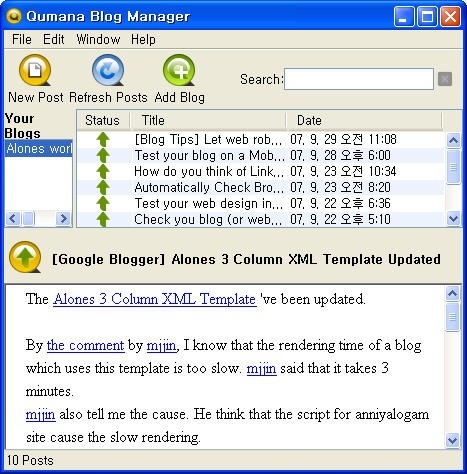
Qumana supports Spellcheck which is not found in Windows Live Writer.
But I could not find how to insert table into a post. (windows Live Writer can do it)
You can download this free tool here.

It is a Firefox add-on. This add-on supports basic functionality for editing. But you should be always on line.
And you can use commercial tools like Ecto, BlogJet and such.
I could not have any chance to use them :).
Ref: Improve Your Workflow with a Blog Editing Program
Saturday, September 29, 2007
[Blog Tips] Let web robots know your blog has been updated
People want to make their blog (or website) take more traffic using such technique as SEO.
I think that ping services are good method to improve the volume of traffic to your website.
In the blogosphere, pinging allow both search engines and blog directories to know that your blog has been updated. And the result of the notification their web robots will visit to your website for crawling. (i.e. they read the new content and apply it to their database)
A ping is just a piece of text containing your website name and the URL. Generally ping is sent in the XML format.
Ping services automatically process the above notification.
There are many ping services as below,
- huge list of RPC and RPC2 services (over 56 RPC and RPC2) by EliottBack
- 20-25 RPC and RPC2 service by Emily
- List of Ping Services by Daily Blog Tips (over 50)
But I think that you need not to use all of above ping services because ping services ping each other. Therefore I suggest the following ways.
In case of Google Blogger
If you use Google Blogger, the ping to Google Blog Search Engine would be automatically sent after your blog has been updated.
You can check it with "Send Pings" options on Settings/Publishing page of Dashboard.
You can manually ping Google Blog Search Engine by this link.
For more details, see this document of Google.
If your blog is claimed at Technorati, use Technorati ping service.
It allows Technorati to know that the claimed website has been updated.
I think that iPings is good service. I usually use this service.
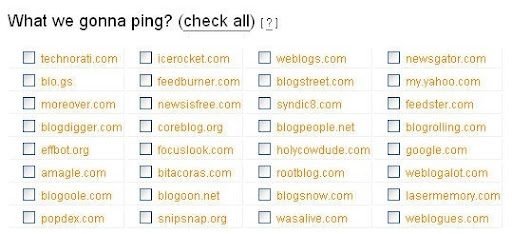
This service automatically ping 32 ping services.
After access this link, type only your website title and URL and RSS Feed URL. Then select targets to ping as below,
Ref
- Ping Service Bookmarks
- XML-RPC Ping Services For Your Blog
- List of Ping Services
Friday, September 28, 2007
Test your blog on a Mobile Phone using web-based emulator
According to a research, After 1 year about 1.3 billion people will connect to the Internet via mobile phones.
To a private (or team) Blog as well as a big website such as Google it will be very important issue making website compatible with visitors browsing from mobile phones.
You can easily test how your blog (or website) would look on a mobile phone by using a web-based emulator provided by dotMobile.
First, access to this link.
Second, enter URL to test.
The emulator of dotMobile supports both Sony K750 model and Nokia N70 model.
The following snapshot is one of this Blog.
For your future visitor how about checking?
Ref: Test Your Website on a Mobile Phone
Sunday, September 23, 2007
Automatically Check Broken Links in your website using Dead-Links.com
You may include many links in your posts both inbound and outbound.
But after several days or months, do you guarantee that links still rightly work?
It is difficult to check if all of links are valid.
In case of this, you can automatically check all of links through the crawler of Dead-Links.com. Step1. Access the Reciprocal Link Checker website.
Step2. Put the address of your website.
Step3. Just click "Launch The Spider!" button.
Then, a little spider will read HTML code and check for the broken links.
Maximum execution time is 45 minutes.
The result show the following lists for you,
- Crawling Internal Links
- Checking External Links
- Valid Links
Ref: Give Your Blog a Checkup
Saturday, September 22, 2007
Test your web design in different browser and OS
Though your website has good looks in FireFox on WindowsXP, in other browser or different OS it looks ugly.
Though using IE Tab of FireFox you can check if your website rightly load in both FireFox and IE, you can not test it in all of browser and on all of OS.
But you can do it by BrowserShots org.
Access this site, and enter a URL to test.
Then you can see the following result.
It may take more than 30 minutes but you can enlarge a screen shot by clicking it and download all of screen shots.
Ref: Give Your Blog a Checkup
Check you blog (or website) speed by using Free website speed checker
Recently, thanks to the reply of mjjin I fixed a problem.
The problem was that because of a script the loading of this blog took too much time.
"Free website speed checker" of SELP SEO can prevent similar problems.
According to the description of the site, if a page does not load within 5-8 seconds you will lose 1/3 of your visitor. It'll be true.
So, you had better check your website speed. Through this checking remove a bad script or widget.
Checking is very easy.
Step1. access "Free website speed checker"
Step2. enter each address on a new line on the edit box. (maximum 10)
Step3. click "Check!"
Then, you can see the similar result as bellow,
Furthermore, I think that the size of website is useful when you are under the traffic problem.
Ref: Give Your Blog a Checkup
Widgetbox provides many useful widgets for your blog.
There are many useful and fun widgets for your blog or your web site in Widgetbox.
Almost Widgets are based on Flash. So they are smart, cool and pretty.
The widgets are well categorized on the left frame.
(Blogosphere, Communication, Fun & Games, Interests, Information, Money Makers, etc)
You can sort them by "Subscriptions" or "Top Rated" or "Data Added".
In case that your blog is powered by famous blog service such as Google Blogger, MySpace, FaceBook, you can directly install the widget on your blog.
Among widgets, I show some widgets as below, Crystal Clock
 Flash Web Counter
 YouTube Videos 2.0
Display a user's YouTube videos, favorite videos, or a specific videos with a certain tag on your website or blog. cyber-pet
interactive cyber pets! Google Site Translator
Open your blog or site up to readers from around the globe with Google Site Translator.
See the Widgetbox, and get the cool widget for your blog~
[Google Blogger] Alones 3 Column XML Template Updated
The Alones 3 Column XML Template 've been updated.
By the comment by mjjin, I know that the rendering time of a blog which uses this template is too slow. mjjin said that it takes 3 minutes.
mjjin also tell me the cause. He think that the script for anniyalogam site cause the slow rendering.
I've found a related post here. Because hackosphere changed its hosting services, it may takes long time.
So, I've removed the script for anniyalogam.
For updating Alones 3 Column XML Template,
- Download it again here.
or
- Delete the following script in your template code in Edit HTML section under Blogger Dashboard.
[History]
v0.1 (09.21, 2007) - initial version
v0.2 (09.22, 2007) - anniyalogam script removed.
Thursday, September 20, 2007
Google Blogger XML 3 column Template
I've introduced good Google Blogger XML template sites.
Among them, I like both Underwater Template and Blue Wave Blogger XML Them.
But I think that
- the top frame of Underwater is not good. The height is too long.
- menus in the top frame of Blue Wave are very attractive.
So, I've integrated Underwater with Blue Wave. The name of the new template is "Alones 3 column XML Template".
The characteristics are as belows,
- XML template for the new version Blogger
- 3 column layer
- The width of the post section is not fixed.
(I think that to write source code the width should not fixed)
- Top frame has menus.
The figure of the integrated template is as belows,
When I write this post, this blog uses above template.
You can download this template here.
To use this template, after download the following file,
Copy & paste to Edit HTML section under Blogger Dashboard
or
Directly upload the downloaded file.
Tuesday, September 18, 2007
Funny. How much your blog worth?
Business Opportunities Weblog provides a funny widget.
They've made a little application by using Technorati API.
It show the worth of your blog by US dollar.
They used both Tristan Louis's research and Technorati score which is related to how many other sites link to it.
Tristan Louis's research show the value of each site of Weblogs Inc with its Technorati score.
Simply, access to the post and type your blog url.
Then you can get the result as below, Above result is my korea blog's. Because this blog is newbie the value is 0$ :)
Sunday, September 16, 2007
Technorati, take more visitors to your blog and see the ranking of your blog
Using "Claim a Blog" of Technorati, you can take more visitor to your blog.
i.e. you can increase your blog's visibility.
After join Technorati, submit your blog url and write a java script code for "Claim a Blog" spider on a post.
In case of Google Blogger, by submitting your account and password you can use this service.
You can know both the ranking and authority of your blog using Technorati blog search engine.
The authority is the number of blogs linking to your blog in the last six months.
For your information, the ranking of Digital Inspiration is 302 and TechCrunch is 3.
And in this page you can get the code of Technorati Bookmark widget
Saturday, September 15, 2007
How to insert Google Adsense Code between the post tile and post body.
Like this blog, you can insert Adsens Ads code between the post tile and post body.
(See the Digital Inspiration blog which earn $999.99 by one day)
This will increase you earning by Google Adsense.
This way is the new version of Google Blogger (i.e. XML version)
Assum that you already have an Adsense account and use the "Signe in" link to grant Blogger access your Adsense ID.
Step1.
Go to Template -> Page Elements tabs.
Then, click on "Edit" in the "Blog Posts" section.
Step2.
In the pop-up window, check the box "Show Ads Between Pots".
I recommend "350X250 Rectangle" format like "Digital Inspiration"
This checking only make Ads appear between posts.
By next stpes, the Ad will be displayed within blog post when indivisual blog post page is visited.
Step3.
Go to Template -> Edit HTML tabs and check the box "Expand Widget Templates".
Step4.
Find the following code in the XML,
and wrap the above code as bellows,
Step5.
Find,
Copy the following code and paste it before
If you paste the code after
Step6.
Save the template, and check your blog if the Ads is shown as we want.
If your blog is "classic" not "the new version XML", refer "How to the AdSense ads to appear between the post title and post body?"
Ref: Wrap Adsense Code Inside Blog Post Without Violating TOS
Thursday, September 13, 2007
Hellow~ this blog is Alones world by english
My korean blog is http://alones.kr/blog and my korean wiki is http://alones.kr/wiki.
And this is my english blog.
This blog will post
about - web 2.0 (tech trend and tips & tricks)
about tips and tricks for c/c++
about programming language and its tools (i.e. IDE and assistance tools)
and about me :)
Subscribe to:
Posts (Atom)