bPopulr provides a good web counter as below,
Above widget is just for this page. You can see the installed widget on right of this blog.
It shows total hits, today hits and here now.
You can get the Free button code here.
Additionally, you can see the referred links of your website and graphical statistics if you click the widget.
And bPopulr home shows the today popular web sites.
All of this good service are free and easy to use. (via coping & pasting the free code)
Showing posts with label seo. Show all posts
Showing posts with label seo. Show all posts
Thursday, October 4, 2007
[Blog Tips] Cool web counter widget showing total, today, here


Wednesday, October 3, 2007
Yahoo search result is best!!
Here are interesting statistics.
As you know, Google appears to dominate and have the most successful search engine.
According to compete.com data there are roughly 7.5 billion search queries preformed every month by the US Online population.
Among them, Google gets about 2/3rds of the volume.
See the following data. From a quantity view, Google has the best search engine.
But let's see the next data.
The following chart shows how many users click on a search result.

in case of Google 65 queries can make users click an URL in the search result.
That is to say 65 query results have an URL which seem to be what people want to search.
Yahoo is 75. MSN is 59.
From a search fulfillment view, Yahoo has the best search engine.
References
Search Fulfillment: Yahoo! is best of breed
Yahoo! Is the Most Fulfilling Search Engine?
Sunday, September 30, 2007
SEO for Blogspot blog
It's very easy, for beginners i upload some pictures:
1. add sitemap
step 1:

step 2:

2. verify your site:
Your Google accounts->Webmaster tools->Dashboard->Verify->Copy the meta tag given
->Edit template->Paste your meta tag on correct position->Save your blog template.

Wow, It's really easy :)
Update (Jan. 08/2008)
If you have already redirected your post feed traffic to your feedburner feed, you may find an error message at Google webmaster page. In this case, you have to delete previous sitemap and add new sitemap like below, so the problem will be solved.
http://alonesworld.blogspot.com/atom.xml?redirect=false
1. add sitemap
step 1:

step 2:

2. verify your site:
Your Google accounts->Webmaster tools->Dashboard->Verify->Copy the meta tag given
->Edit template->Paste your meta tag on correct position->Save your blog template.

Wow, It's really easy :)
Update (Jan. 08/2008)
If you have already redirected your post feed traffic to your feedburner feed, you may find an error message at Google webmaster page. In this case, you have to delete previous sitemap and add new sitemap like below, so the problem will be solved.
http://alonesworld.blogspot.com/atom.xml?redirect=false
Saturday, September 29, 2007
[Blog Tips] Let web robots know your blog has been updated
People want to make their blog (or website) take more traffic using such technique as SEO.
I think that ping services are good method to improve the volume of traffic to your website.
In the blogosphere, pinging allow both search engines and blog directories to know that your blog has been updated. And the result of the notification their web robots will visit to your website for crawling. (i.e. they read the new content and apply it to their database)
A ping is just a piece of text containing your website name and the URL. Generally ping is sent in the XML format.
Ping services automatically process the above notification.
There are many ping services as below,
- huge list of RPC and RPC2 services (over 56 RPC and RPC2) by EliottBack
- 20-25 RPC and RPC2 service by Emily
- List of Ping Services by Daily Blog Tips (over 50)
But I think that you need not to use all of above ping services because ping services ping each other. Therefore I suggest the following ways.
In case of Google Blogger
If you use Google Blogger, the ping to Google Blog Search Engine would be automatically sent after your blog has been updated.
You can check it with "Send Pings" options on Settings/Publishing page of Dashboard.
You can manually ping Google Blog Search Engine by this link.
For more details, see this document of Google.
If your blog is claimed at Technorati, use Technorati ping service.
It allows Technorati to know that the claimed website has been updated.
I think that iPings is good service. I usually use this service.
This service automatically ping 32 ping services.
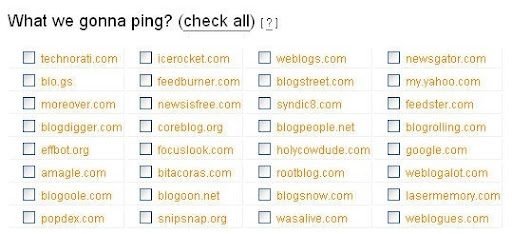
After access this link, type only your website title and URL and RSS Feed URL. Then select targets to ping as below,
Ref
- Ping Service Bookmarks
- XML-RPC Ping Services For Your Blog
- List of Ping Services
Sunday, September 23, 2007
How do you think of Link exchanges?
How do you think of Link exchanges?
I have two Chinese blogs at Google Blogger, and i have made link exchanges with some other bloggers before; Simply speaking, i wanted to get more traffic to my blog and improve own PageRank. But now, it seems Google asserts that "Link Exchanging will lower your PageRnak",
the offical documentation is here.
I am not a past master at SEO, i think most of bloggers are not, too. If so, WHAT are the right things we should do? Below is my idea :
1. Do not make link exchanges with other blogs, just follow Google's suggestions;
2. Of course, Link exchanges will increase your Technorati authority, if the link exchanges are necessary, you should link to higher quality of links;
3. The most important thing, also the best way to increase your blog PageRank is to write things that are interesting to other bloggers so they will link to you;
4. Include links in your posts, linking to other blogs will not decrease your PageRank. I think it is mutual, You can link to your neighbourhood and some valuable blog posts and great sources which you want to share with people who come to your blog.
(I'm mjjin, i live in China, this is my first post in ENGLISH since i joined in Alones World blog as team member. Frankly speaking, my english is not good, you may find some mistakes in my blog posts in the future. A friend of mine, her name is Lansy, we have known each other through MyBloglog, she told me before, "Don't worry about mistakes. Mistakes make life perfect." )
I have two Chinese blogs at Google Blogger, and i have made link exchanges with some other bloggers before; Simply speaking, i wanted to get more traffic to my blog and improve own PageRank. But now, it seems Google asserts that "Link Exchanging will lower your PageRnak",
the offical documentation is here.
I am not a past master at SEO, i think most of bloggers are not, too. If so, WHAT are the right things we should do? Below is my idea :
1. Do not make link exchanges with other blogs, just follow Google's suggestions;
2. Of course, Link exchanges will increase your Technorati authority, if the link exchanges are necessary, you should link to higher quality of links;
3. The most important thing, also the best way to increase your blog PageRank is to write things that are interesting to other bloggers so they will link to you;
4. Include links in your posts, linking to other blogs will not decrease your PageRank. I think it is mutual, You can link to your neighbourhood and some valuable blog posts and great sources which you want to share with people who come to your blog.
(I'm mjjin, i live in China, this is my first post in ENGLISH since i joined in Alones World blog as team member. Frankly speaking, my english is not good, you may find some mistakes in my blog posts in the future. A friend of mine, her name is Lansy, we have known each other through MyBloglog, she told me before, "Don't worry about mistakes. Mistakes make life perfect." )
Automatically Check Broken Links in your website using Dead-Links.com
You may include many links in your posts both inbound and outbound.
But after several days or months, do you guarantee that links still rightly work?
It is difficult to check if all of links are valid.
In case of this, you can automatically check all of links through the crawler of Dead-Links.com. Step1. Access the Reciprocal Link Checker website.
Step2. Put the address of your website.
Step3. Just click "Launch The Spider!" button.
Then, a little spider will read HTML code and check for the broken links.
Maximum execution time is 45 minutes.
The result show the following lists for you,
- Crawling Internal Links
- Checking External Links
- Valid Links
Ref: Give Your Blog a Checkup
Saturday, September 22, 2007
Check you blog (or website) speed by using Free website speed checker
Recently, thanks to the reply of mjjin I fixed a problem.
The problem was that because of a script the loading of this blog took too much time.
"Free website speed checker" of SELP SEO can prevent similar problems.
According to the description of the site, if a page does not load within 5-8 seconds you will lose 1/3 of your visitor. It'll be true.
So, you had better check your website speed. Through this checking remove a bad script or widget.
Checking is very easy.
Step1. access "Free website speed checker"
Step2. enter each address on a new line on the edit box. (maximum 10)
Step3. click "Check!"
Then, you can see the similar result as bellow,
Furthermore, I think that the size of website is useful when you are under the traffic problem.
Ref: Give Your Blog a Checkup
Subscribe to:
Posts (Atom)